HubSpot Implementation Costs and Timelines in Australia

Dana Cano
CRM Manager at BFJ Digital

Keep ahead of the curve via our latest trends newsletter.
Contact us nowKey takeaways
- HubSpot costs fall into four buckets: software, onboarding, implementation and ongoing optimisation. The first two are HubSpot charges.
- Implementation cost is set by your business, not your subscription. Data condition, CRM migration, pipeline complexity, integrations and team size move the price far more than which Hub you buy.
- As a rough guide, Australian implementations run from around $4,000 for a clean, simple setup to $60,000 or more for a complex, multi-team migration. Timelines run from a few weeks to several months on the same logic.
- The cheapest quote is rarely the cheapest implementation. A poorly built portal costs more to unpick later than it saved at the start.
- Most delays are not the agency's fault. They come from data access, internal approvals and stakeholder availability, and you can remove a lot of them before the project starts.
You have decided HubSpot is the platform. Now you need a number. You ask a few HubSpot partners for a quote, and the numbers come back thousands of dollars apart for what looks like the same job. One partner talks about weeks. Another talks about months. HubSpot itself has quoted you a separate onboarding fee, and you are not sure what that even buys.
That confusion is often the starting point for most HubSpot buyers in Australia. The reason the quotes vary so much is that you are not really paying someone to "set up HubSpot". You are paying to make HubSpot fit the way your business generates leads, manages a pipeline and converts revenue. Two companies can buy the exact same HubSpot subscription and face completely different implementation costs, because the cost is driven by the business underneath the software, not the software itself.
We work with these numbers every week as a HubSpot Diamond Solutions Partner, and this is the explanation we give clients before they commit a budget.
The things you actually pay for
When someone quotes you for "HubSpot", they could be pricing any of four different things. Getting these clear is the single most useful step before you compare proposals.
What you pay for | Who charges it | What it covers | When you pay |
|---|---|---|---|
Software subscription | HubSpot | The ongoing licence for the Hubs, tiers and seats you use | Monthly or annually, for as long as you use it |
HubSpot onboarding | HubSpot | Guided setup and technical guidance from HubSpot, required on most Professional and Enterprise plans | One-time, at the start |
Implementation | Your partner, a freelancer, or your internal team | The professional work to configure HubSpot around how your business runs | One-time project fee, or in stages |
Ongoing optimisation | Your partner or internal team | Improving the CRM, automation, reporting and adoption after launch | Monthly retainer or ad hoc, ongoing |
The mistake we see most often is treating the licence as the total cost. In the first year, onboarding and implementation are usually the larger line item, not the subscription. Keep these four buckets separate and a confusing set of quotes suddenly becomes easy to read.
What HubSpot itself costs in Australia
Two of those four buckets are charged by HubSpot directly. It helps to deal with those first, because they are the parts you can look up rather than negotiate.
HubSpot pricing changes regularly, and it now prices most plans on a per-seat basis in Australian dollars.
HubSpot plan (indicative AUD) | Rough cost | Notes |
|---|---|---|
Free tools | $0 | Core CRM, limited features, no cost |
Starter | From around $20 per seat / month | Small teams, light needs |
Marketing Hub Professional | From around $1,380 / month | Includes a set number of marketing contacts; cost rises as your contact database grows |
Sales or Service Hub Professional | Around $155 per seat / month | Priced per user |
Enterprise tiers | From several thousand dollars / month | Larger teams, advanced permissions, custom objects |
The figures below are indicative of HubSpot's published Australian pricing at the time of writing. Always confirm the current numbers on HubSpot's own pricing page before you budget, because tiers and inclusions move.
Marketing Hub cost scales with your number of marketing contacts, so a growing database quietly increases the monthly bill. Add-ons such as extra seats, transactional email and dedicated IPs are priced separately again.
If you are weighing HubSpot against another platform on total cost, our comparison of HubSpot versus Salesforce walks through where each one lands.
HubSpot's onboarding fee
On most Professional and Enterprise plans, HubSpot charges a one-time onboarding fee on top of the licence. At the time of writing, HubSpot's published Australian onboarding fees sit roughly in this range:
Plan (indicative AUD) | HubSpot onboarding fee |
|---|---|
Sales Hub Professional | Around $2,160 |
Service Hub Professional | Around $2,160 |
Marketing Hub Professional | Around $4,320 |
Sales or Service Hub Enterprise | Around $5,040 |
Marketing Hub Enterprise | Around $10,080 |
HubSpot's onboarding team helps you understand the platform, points you to the right settings and gives you a plan. You, or your partner, still do the configuration work.
A HubSpot Solutions Partner can often deliver onboarding as part of a wider implementation, and in some cases the standard HubSpot onboarding fee can be waived when a partner runs the project. It is worth asking.
What a HubSpot implementation actually includes
Here is where the real spread in quotes comes from.
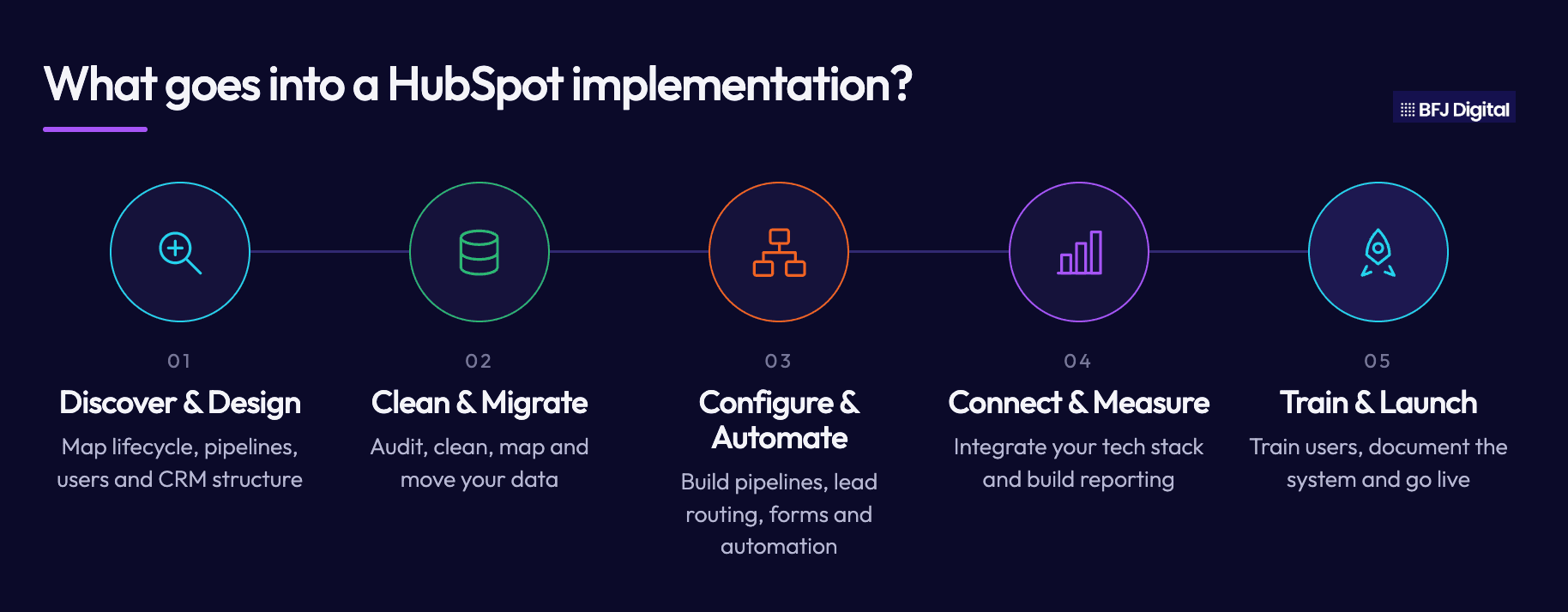
"Implementation" is the professional work that turns a blank HubSpot portal into a system your teams actually use. It usually runs across five stages, and each one moves both the cost and the timeline.
1. Discovery and CRM architecture. Before anyone touches a setting, a good implementation maps how your business works: your lead lifecycle, your sales stages, who needs access to what, and what management needs to see. This stage decides the structure of the whole portal, including custom objects, properties, lifecycle stages and pipeline design. Skimp here and every later stage inherits the mess.
2. Data audit, cleaning and migration. Moving your contacts, companies and deal history into HubSpot is often the single biggest driver of cost and time. The work is rarely the import itself. It is the cleaning beforehand: removing duplicates, fixing incomplete records, mapping old fields to new ones and deciding what history is worth keeping. Dirty data migrated badly poisons trust in the CRM from day one, so this stage earns its budget.
3. Sales and marketing configuration. This is the build most people picture. Pipelines and deal stages that match how your team actually sells. Lead routing and lead scoring. Forms, email, tracking, and the marketing automation that nurtures a lead through to a sales conversation. The more branches and rules your process needs, the longer this takes.
4. Reporting, dashboards and integrations. A CRM that cannot answer management's questions is a database, not a decision tool. This stage builds the dashboards leaders will rely on and connects the revenue attribution that shows which marketing actually produces the pipeline. It also covers integrations to the rest of your stack, from accounting tools to your website, sometimes through custom API development where a native connector does not exist.
5. Training, go-live and documentation. The best-configured portal is worthless if the team does not use it. This stage covers role-specific training and onboarding, a documented record of how the portal has been built, and hands-on support through the first weeks of live use.
None of these stages is optional in a proper build. What changes between a $4,000 project and a $60,000 project is how much sits inside each one.
Why two businesses pay very different prices
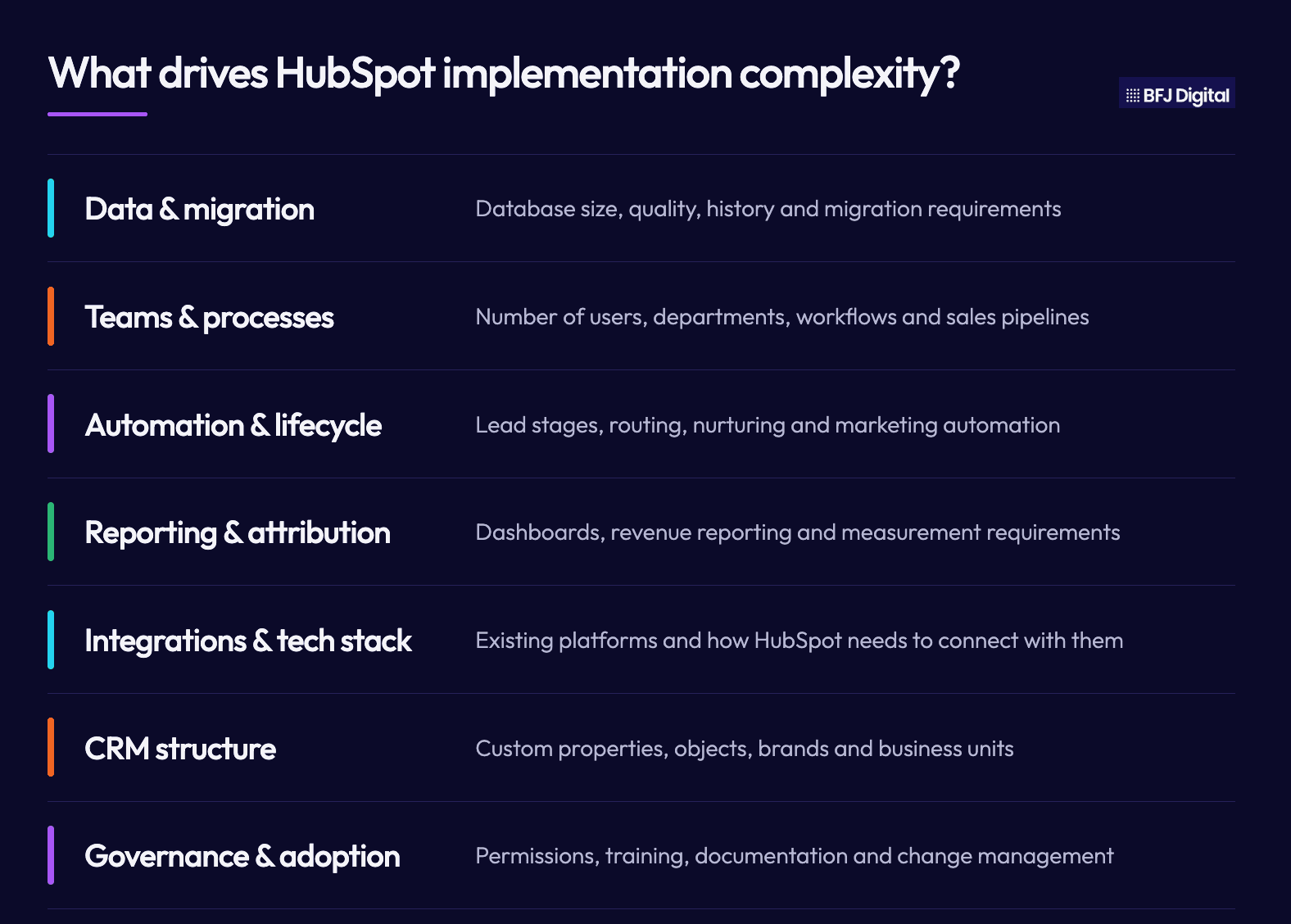
Because the software is the same for everyone, the price is set by the business underneath it. These are the factors that move a HubSpot implementation cost the most:
- The number and condition of your existing databases, and how clean the data is
- CRM migration complexity, especially from a system like Salesforce with years of history
- How many teams will use HubSpot, and how different their needs are
- Sales pipeline complexity and the number of pipelines
- Marketing automation and lead lifecycle design
- Reporting and attribution requirements
- Your existing technology stack and the integrations it needs
- Custom objects and properties, and multiple brands or business units
- Permissions, governance, training and change management
A quick comparison makes this real. Picture two companies that both buy the same Sales Hub and Marketing Hub Professional subscription.
The first is a 15-person B2B services firm. Its data lives in one reasonably tidy spreadsheet. It runs a single sales pipeline and needs a handful of automated follow-ups. That implementation is clean, and it lands at the lower end of the range in a few weeks.
The second is a 120-person business with three divisions, an ageing Salesforce instance holding 60,000 contacts, four pipelines, a website to connect and a finance system to integrate.
Same subscription, but the implementation is a multi-month program of work costing many times more.
The difference is not HubSpot. It is everything the business is asking HubSpot to hold.
Indicative costs and timelines in Australia
These are indicative ranges for the implementation work in Australia, separate from the HubSpot licence and onboarding fees above. Real quotes depend on scope, and where a project is genuinely complex the range widens rather than narrows.
Implementation type | Typical scenario | Indicative cost (AUD) | Indicative timeline |
|---|---|---|---|
Straightforward | Small team, clean data, one pipeline, limited automation and few or no integrations | Around $4,000 to $10,000 | 2 to 4 weeks |
Mid-complexity | Multiple pipelines, a CRM migration, marketing automation and management reporting | Around $12,000 to $25,000 | 6 to 12 weeks |
Complex | Enterprise CRM, several teams, significant migration, multiple integrations and custom objects | $25,000 to $60,000 or more | 3 to 6 months or more |
A CRM migration from Salesforce or another legacy system is the item most likely to push a project from one band to the next. Depending on data volume and how much cleaning it needs, migration alone can add somewhere in the region of $8,000 to $25,000 to a mid or complex build.
On top of the one-time implementation, most businesses invest in ongoing optimisation. A monthly retainer to improve reporting, build new workflows and support adoption typically runs from around $1,000 to $3,000 or more per month. That is not a cost of getting it live. It is the cost of the platform continuing to earn its keep.
How long a HubSpot implementation takes, and what actually delays it
Timelines get quoted as if they depend entirely on the agency. They do not. A partner controls the build. The clock is often controlled by you.
Here is how the time tends to distribute across a mid-complexity project. Stages overlap in practice, so this is a shape, not a strict sequence.
Stage | Indicative duration | The main variable |
|---|---|---|
Discovery and architecture | 1 to 2 weeks | How settled your sales and lifecycle process is |
Data audit, cleaning and migration | 1 to 4 weeks | Data volume and how messy it is |
Build and automation | 2 to 6 weeks | Number of pipelines and complexity of workflows |
Integrations | 1 to 4 weeks, often in parallel | Native connectors versus custom build work |
Reporting and dashboards | 1 to 2 weeks | How clearly management defines what it needs |
Training and go-live | 1 to 2 weeks | Team size and availability |
Notice how many of those variables are about your business, not the build. The delays that blow out timelines are almost always dependencies:
- Getting access to the data, and getting it in a usable state
- Internal approvals and sign-offs that sit with busy people
- Stakeholder availability for discovery and decisions
- Sales process questions that the business has never actually settled
- Scope that grows once people see what HubSpot can do
The good news is that you can remove most of these before the project starts. Nominate one internal owner who can make decisions. Pull your data together and have a first look at its condition. Agree your sales stages and lifecycle definitions internally. List the integrations you need and who owns each connected system. A business that does this preparation can shorten a mid-complexity implementation by weeks, and it usually gets a better build, because the decisions were made deliberately rather than under time pressure.
The cheapest quote is rarely the cheapest implementation
There is real commercial risk in choosing on price alone, and it is worth understanding calmly rather than as a scare.
A low-cost implementation saves money at the start by doing less thinking. Properties get created without any governance, so within months the portal is full of duplicated and inconsistent fields. Lifecycle stages are defined loosely, so reporting on where leads actually sit becomes guesswork. Pipelines do not match how the team really sells, so the sales team quietly goes back to its spreadsheet. Automations are built in a way nobody can maintain. Attribution is configured incorrectly, so the numbers management relies on are wrong. Integrations break and nobody notices. And because nothing was documented, the next person to touch the portal has to reverse-engineer it before they can fix anything.
The cost of unpicking all of that later is almost always higher than the cost of building it properly once. A cheap setup that the team does not adopt has a return of zero, no matter how little it costs. When you compare quotes, the useful question is not "which is cheapest", it is "which of these will still be working, and trusted, in two years".
HubSpot onboarding versus partner implementation
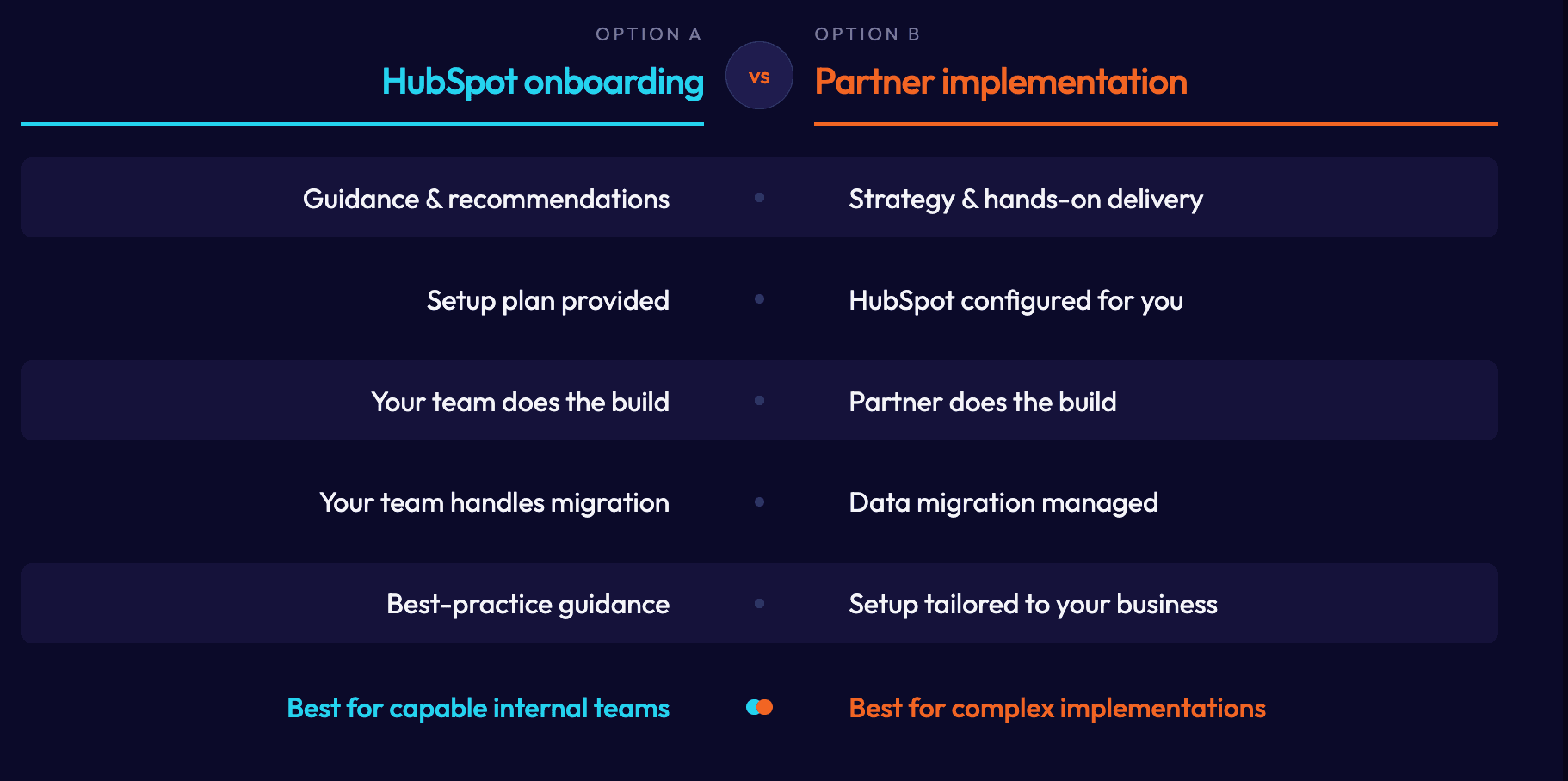
This is one of the most common points of confusion, so it is worth being precise. HubSpot onboarding and a partner implementation are not the same thing, and one is not a cheaper version of the other.
HubSpot onboarding is guidance delivered by HubSpot. A HubSpot specialist helps you understand the platform, recommends how to set things up and gives you a plan to follow. It is genuinely useful, particularly for a team with the time and the internal skill to do the configuration work themselves. What it does not do is build the system for you.
A partner implementation is done-for-you work. The partner does the configuration, the migration, the automation, the reporting and the integrations, shaped around your business rather than a generic best-practice checklist. It also brings strategy: the partner decides how HubSpot should be structured to support how you generate and convert revenue, rather than only which buttons to press.
They can overlap, and a good partner will cover the ground HubSpot's onboarding would have covered anyway. The practical test is simple. If your requirements are straightforward and you have capable people with time to build it, HubSpot's onboarding may be all you need. If you are migrating from another CRM, connecting several systems, aligning sales and marketing, or you simply do not have the internal capacity, you are into implementation territory.
Your implementation options, compared honestly
There is no single right answer here, and it would be dishonest to pretend a partner is always the correct choice. Here is how the four realistic options compare.
Option | Best suited to | Watch out for |
|---|---|---|
DIY (internal team) | Organisations with strong in-house HubSpot or CRM expertise and relatively simple requirements | Underestimated effort; the real cost is your team's time, and it often takes far longer than planned |
HubSpot onboarding | Teams that want expert guidance but will do the build themselves | It is guidance, not a build; you still need the internal capacity to execute |
Freelance consultant | Smaller or clearly defined projects with a tight, single-track scope | Limited coverage across strategy, migration, integrations and support; continuity risk |
Implementation partner or agency | Projects needing strategy, migration, integrations, automation, reporting, sales and marketing alignment, or ongoing support | Cost is higher up front; the value is in avoiding rework and driving adoption |
If your project is small and your team is capable, DIY or HubSpot onboarding may be exactly right, and you should not overspend to hear otherwise.
The case for a HubSpot implementation partner gets stronger as migration, integrations and multiple teams enter the picture, because that is where an untidy build quietly becomes expensive.
Questions to ask before you accept a quote
Two implementation proposals can look similar on the front page and mean very different things. These questions surface the difference, and they let you compare like with like:
- What exactly is included in the implementation fee, stage by stage?
- Is data migration included, and who is responsible for cleaning the data?
- Are integrations included, or priced separately once we start?
- Is marketing automation included, and to what level of complexity?
- Is reporting included, and will it answer the questions management actually asks?
- How much training is provided, and for how many people?
- Who owns the documentation of how the portal has been built?
- What happens after go-live, and is ongoing support quoted separately?
- What assumptions is this quote based on, and what could change the price?
- Are there third-party or add-on costs we should expect?
- How are scope changes handled once the project is underway?
A partner who answers these clearly is a partner you can trust with the build. Vague answers here tend to become surprises later.
Making HubSpot fit your business
The number on a HubSpot quote is really a proxy for a harder question: how much work does it take to make this platform reflect the way your business generates, manages and converts revenue.
A clean, simple business gets a low number. A complex one with years of data and several teams gets a higher one. Neither number is right or wrong. What matters is that the build holds up, the team adopts it, and the reporting can be trusted.
As a HubSpot Diamond Solutions Partner, we scope implementations around exactly that. If you want a considered view on what your HubSpot project would take, in cost and in time, our HubSpot partner team and wider CRM development work is a sensible place to start the conversation.
Frequently asked questions
How much does a HubSpot implementation cost in Australia?
As an indicative guide, a straightforward implementation with clean data and simple requirements runs from around $4,000 to $10,000. A mid-complexity project with a migration, automation and reporting sits around $12,000 to $25,000. A complex, multi-team build with significant migration and integrations can be $25,000 to $60,000 or more. These figures are separate from the HubSpot licence and onboarding fees.
How long does a HubSpot implementation take?
A simple setup can be live in 2 to 4 weeks. A mid-complexity implementation usually takes 6 to 12 weeks. A complex enterprise migration can run 3 to 6 months or longer. Most of the variation comes from data condition, integration requirements and how quickly internal decisions and approvals happen.
Does HubSpot charge an onboarding fee?
Yes. On most Professional and Enterprise plans, HubSpot charges a one-time onboarding fee separate from the licence. At the time of writing, this ranges from roughly $2,160 for Sales or Service Hub Professional up to around $10,080 for Marketing Hub Enterprise in Australian dollars. It buys guidance rather than a finished build, and a partner can sometimes deliver it as part of a wider project.
Is HubSpot onboarding the same as a HubSpot implementation?
No. Onboarding is guidance from HubSpot that helps you understand the platform and plan your setup. Implementation is the hands-on work of configuring, migrating, automating and integrating HubSpot around your business. Onboarding tells you what to do; implementation does it for you.
Can I implement HubSpot myself?
Yes, if your requirements are relatively simple and you have people with HubSpot or CRM experience and the time to do it. The real cost of DIY is your team's time, and setups often take longer than expected. Migrations, integrations and complex automation are where doing it yourself becomes risky.
How much does it cost to migrate from Salesforce or another CRM to HubSpot?
It depends heavily on data volume and condition. As a guide, migrating from a legacy CRM can add somewhere around $8,000 to $25,000 to a mid or complex implementation. The expensive part is rarely the import itself, it is cleaning and mapping the data beforehand so the new CRM can be trusted.
Why do HubSpot implementation quotes vary so much?
Because the price reflects your business, not the software. Data condition, migration complexity, number of teams, pipeline and automation requirements, integrations and reporting all move the number. Two companies on the same subscription can face very different implementation costs for exactly these reasons.
Dana Cano
Dana Cano is the CRM Manager at BFJ Digital, specialising in CRM and marketing automation with over a decade of experience in digital marketing. Dana empowers teams to scale business growth by optimising operations through automation tools and seamlessly integrating CRM technology into daily workflows.
Her expertise lies in identifying and eliminating operational friction points that slow down business growth, whether through poor alignment between teams, redundant manual tasks, or inefficient communication processes.
Over the past 10 years, Dana has helped numerous companies significantly increase revenue by implementing streamlined CRM systems that enhance both efficiency and effectiveness.
With a strong educational foundation, including MicroMasters in both Business Leadership and UX Design and Evaluation alongside her bachelor's degree in Communications and Advertising, she brings a unique perspective that combines technical proficiency with user-centred design thinking.
Her approach ensures that CRM implementations are not just technically sound but also intuitive and readily adopted by teams, maximising return on investment and driving sustainable business growth.
Ready to See the Bigger Picture?
Want to understand how your digital and real-world marketing impact each other? Not sure if your CRM is supporting your paid media efforts? Just need some clarity and a clear plan to better ROI? Book your free strategy session today for an in-depth audit and action plan to double your digital marketing ROI.
- Meet with a strategy specialist to build a growth plan
- Increase your media performance by up to 200%
- Improve business efficiencies to increase ROI via automation and increase profit
- We cut to the chase. What digital marketing is actually working?