Your iPhone Google Ads Leads Show Up as Direct in HubSpot. Here's the Fix.
Keep ahead of the curve via our latest trends newsletter.
Contact us nowKey takeaways
- iPhone Google Ads clicks often arrive with a gbraid or wbraid instead of a gclid. Forms that only capture gclid record those leads as "direct".
- 63% of Australian mobile web traffic is on iOS, so this gap is bigger here than in most markets.
- No new tool is needed: capture all three click IDs, store them first-party and map them to HubSpot properties.
- Safari deletes browser-written cookies after 7 days. Write your attribution cookie from your server so iPhone leads that convert later keep their source.
- Send gbraid and wbraid back in offline conversion uploads so Smart Bidding learns from qualified leads.
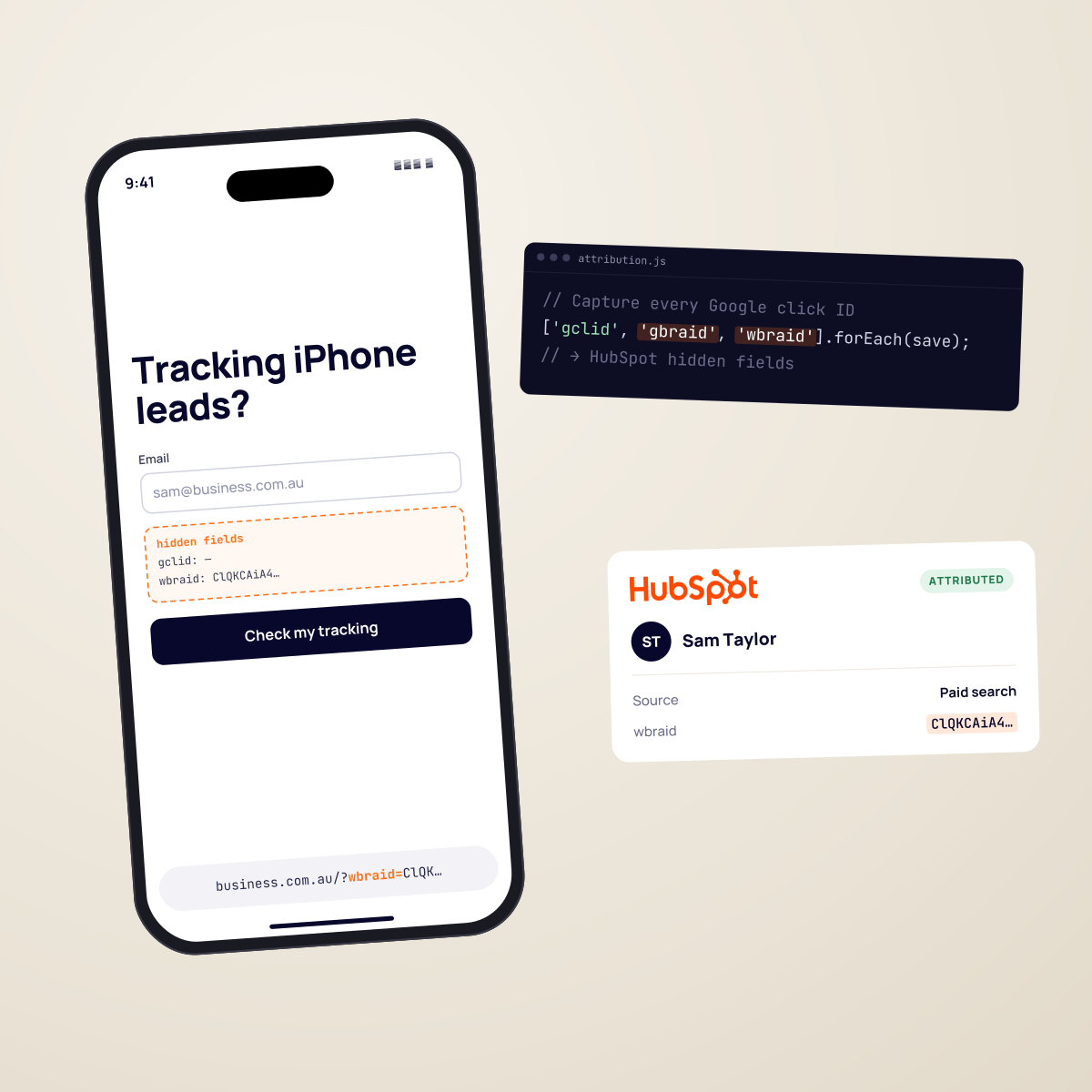
Many Google Ads clicks from iPhones don't carry a gclid. Google often sends a gbraid or wbraid instead, and plenty of HubSpot forms still don't capture them. Those leads land in HubSpot as "direct" or "unknown". In Australia, where 63% of mobile web traffic is on iOS, that's a big share of your paid leads. If your forms only look for gclid and UTMs, here's what to check.
The symptom: paid leads that look like direct traffic
You're running Google Ads. Leads are coming in. But when you open HubSpot, a chunk of them have no campaign, no keyword and no click ID. They sit under "direct traffic", as if someone typed your URL from memory.
That matters for three reasons:
- You can't see what's working. Cost per lead by campaign is wrong if some of the leads aren't credited to any campaign.
- Google Ads can't learn. Smart Bidding optimises on the conversions you send back. Missing leads mean it learns from less data than you actually have.
- You can't send qualified leads back. Offline conversion import needs a click ID. No ID, no match.
This isn't new. Google stopped sending gclid for some iOS app traffic in July 2021, and Safari's protections have tightened every year since. But plenty of HubSpot setups were built for a gclid-only world and never updated.
Why it happens
Apple changed the rules in iOS 14.5 with App Tracking Transparency (ATT). Apps now have to ask before tracking users across other apps and sites. Google responded by changing what it attaches to some iPhone ad clicks.
There are now three click IDs to know about:
Click ID | What it's for |
|---|---|
gclid | The standard Google click ID. Still used for most clicks. |
gbraid | Used for some iOS clicks where the conversion happens in an app. |
wbraid | Used for some iOS clicks from an app where the conversion happens on a website. |
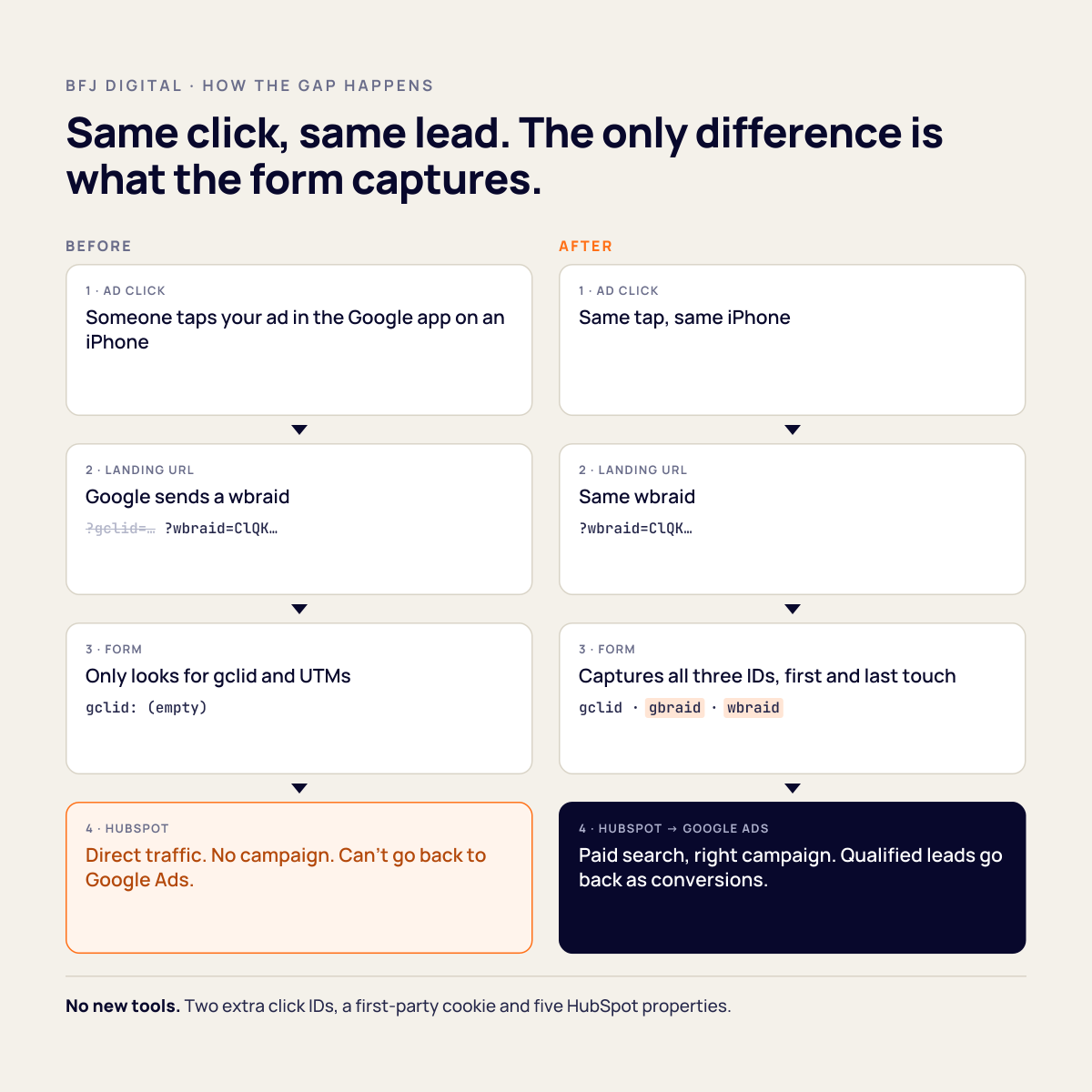
If someone taps your ad inside the Google or YouTube app and lands on your site, you may get a wbraid and no gclid.
Safari adds two more problems:
- Private browsing strips gclid. Safari's tracking protection removes gclid from ad URLs in Private Browsing by default. Users who switch that protection to "All Browsing" lose it in every session. gbraid and wbraid aren't removed, so they're often the only link left between the click and the lead (PPC Land).
- Browser-written cookies expire in 7 days. Intelligent Tracking Prevention (ITP) caps cookies written by page scripts at 7 days, whatever expiry you set. Any iPhone lead that converts after a week loses its source.
Google now flags this too. Since July 2026, Google Analytics shows a diagnostic when gbraid is missing from URLs that carry a gclid (PPC Land).
What most HubSpot setups miss
Most HubSpot forms capture UTMs and, if someone set it up, gclid. Many also record landing page and referrer. Two things are often missing:
- gbraid and wbraid. If a click arrives without a gclid, there's nothing to tie the lead back to Google Ads.
- The page the form was submitted on. You know where people landed, but not where they converted.
What a complete setup looks like
You don't need a new tool. Make sure these five things are in place:
- Capture gbraid and wbraid alongside gclid, for first and last touch. If gbraid isn't in the URL, fall back to Google's own
_gcl_gbcookie. - Keep them in a first-party cookie. No extra scripts from other companies, no third-party cookies.
- Add a hidden current_page_url field so HubSpot records the exact page each form was submitted on.
- Create matching HubSpot contact properties: first gbraid, last gbraid, first wbraid, last wbraid, and current page URL.
- Map them on every lead form, so no form slips through.
Here's the core of the capture logic, simplified:
// Read click IDs from the landing URLconst params = new URLSearchParams(window.location.search);const ids = {};['gclid', 'gbraid', 'wbraid'].forEach((key) => { const value = params.get(key); if (value) ids[key] = value;}); // Store first touch once, overwrite last touch every visit// (save to your own first-party cookie, ideally set server-side) // On each form, fill the hidden fieldsdocument.querySelectorAll('input[name="last_wbraid"]').forEach((el) => { el.value = ids.wbraid || '';});
The 7-day trap: where your cookie is written matters
Most attribution scripts write their cookie in the browser, with JavaScript. Safari treats that as tracking and deletes it after 7 days, even if you set it for 90.
So someone taps your ad on their iPhone, thinks about it, and comes back 10 days later to fill in your form. The click ID is gone. The lead lands as direct.
The fix is to write the cookie from your own server, in the page response, rather than from a script. Safari doesn't apply the 7-day cap to cookies set that way, so yours keeps its full lifetime, typically 90 days.
One catch: it has to be your own site's server. If the cookie comes from a tracking subdomain that points to another company's servers, Safari can still cap it.
Privacy: first-party only
Better attribution shouldn't mean more tracking. Keep everything in a first-party cookie on your own domain, and only share it with the platforms the lead already came through.
Respect Global Privacy Control (GPC) too. It's a browser signal that says "don't track me". Give visitors who send it a session-only cookie instead of a long-lived one.
With Australia's Privacy Act reforms still rolling out, it's worth building this way now rather than retrofitting later.
The size of the gap in Australia
Australia is an iPhone market, so this gap is bigger here than in most countries. By BFJ's estimate, around 1 in 10 Australian mobile sessions could arrive without a gclid from Safari private browsing alone.
Measure | Share | Source |
|---|---|---|
Australian mobile web traffic on iOS (Sept 2026) | 63% | |
Australian mobile browsing in Safari (Oct 2026) | 49% | |
Safari sessions in private browsing, where gclid is stripped | ~20% | Luc Nugteren, via PPC Land |
Australian mobile sessions that could arrive without a gclid | ~10% | BFJ estimate (49% × 20%) |
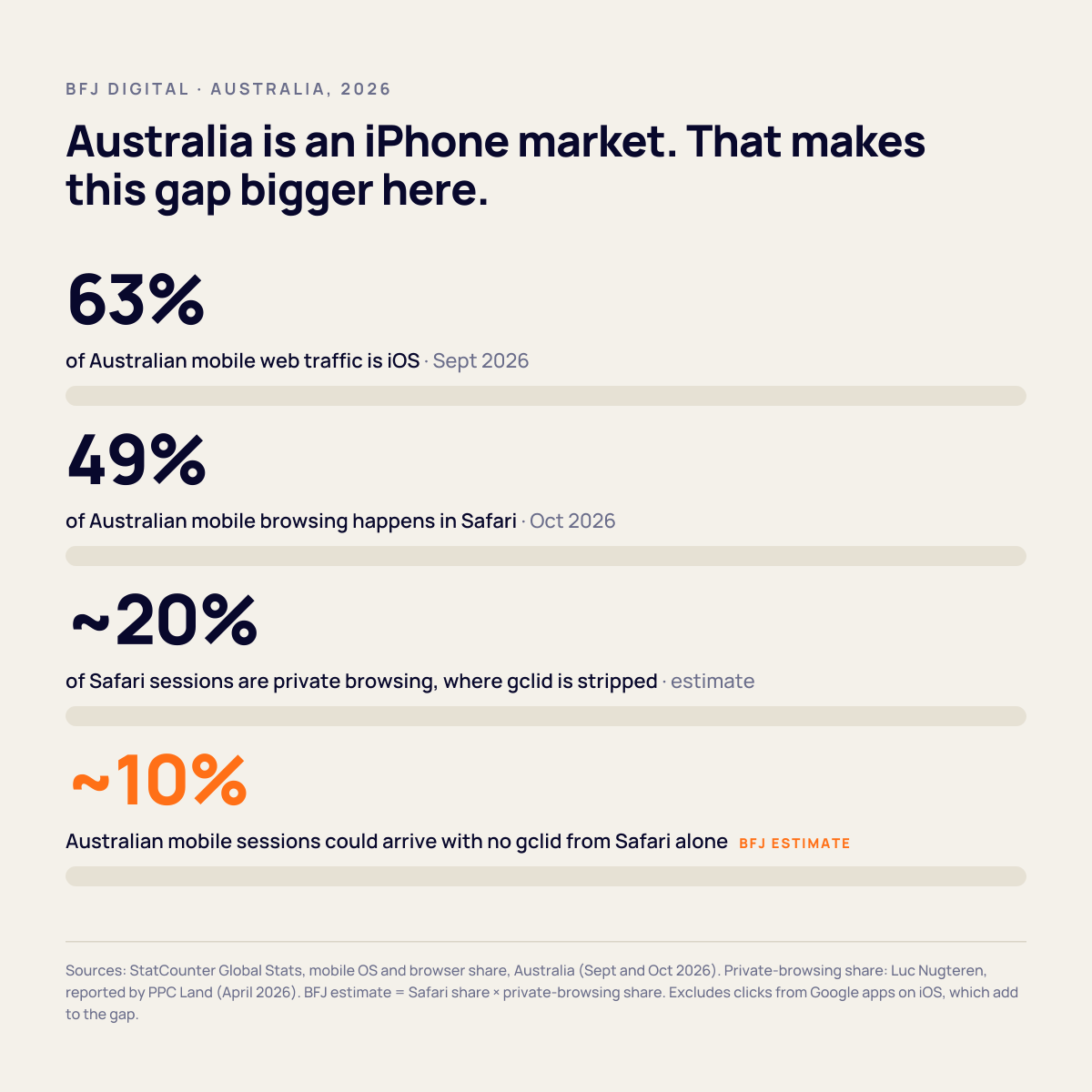
That 10% is a floor, not a ceiling. It doesn't include taps on ads inside Google's own iOS apps, where Google has sent gbraid or wbraid instead of gclid since 2021. It also doesn't include people who've switched Safari's protection to cover all browsing.
Check your own setup in 5 steps
- Measure the gap. Pull a week of paid-search contacts in HubSpot. What share have no click ID?
- Capture all three IDs. Read gclid, gbraid and wbraid from landing URLs, first and last touch.
- Store them first-party, server-side. Write the cookie from your own server, not the browser, so Safari keeps it beyond 7 days. Pass the values into hidden form fields.
- Create matching HubSpot properties. One per ID per touch, plus the page the form was submitted on.
- Send them back to Google Ads. Include gbraid and wbraid in your offline conversion uploads, not just gclid. Check Google's rules first: gbraid and wbraid can't be sent together.
Want to know what share of your paid leads land as direct?
We'll run a free HubSpot and Google Ads attribution check. You'll see how many of your paid leads are missing a click ID, where the gap is, and what it takes to close it.
Frequently asked questions
Why do iPhone leads lose their source after a week?
Safari deletes cookies written by page scripts after 7 days. If your attribution cookie is set in the browser, any lead that converts later than that loses its click ID. Writing the cookie from your own server avoids the cap.
Why are my Google Ads leads showing as direct in HubSpot?
Usually because the click arrived without a gclid, or the click ID wasn't passed into the form. iPhone clicks often carry gbraid or wbraid instead, which most HubSpot setups ignore.
What's the difference between gclid, gbraid and wbraid?
gclid is Google's standard click ID. gbraid and wbraid are used for some iOS clicks since Apple's App Tracking Transparency changes. gbraid relates to app conversions, wbraid to web conversions from app clicks.
Can I upload gbraid and wbraid as offline conversions?
Yes, with limits. Since October 2025 you can send gclid and gbraid together, but never gbraid and wbraid together. Conversions that carry only a gbraid or wbraid can't include custom variables or cart data, and don't work with enhanced conversions for web.
Do I need a new attribution tool to fix this?
No. You need to capture the extra click IDs, store them first-party and map them to HubSpot properties.
Is this compliant with privacy rules?
Storing click IDs in a first-party cookie is standard practice. Respect consent signals like Global Privacy Control and cover it in your privacy policy.
Ready to See the Bigger Picture?
Want to understand how your digital and real-world marketing impact each other?
Not sure if your CRM is supporting your paid media efforts? Just need some clarity and a clear plan to better ROI?
Book your free strategy session today for an in-depth audit and action plan to double your digital marketing ROI.